
Description
Product Overview
The KUKA KCP2 00-130-547 is a handheld teach pendant used as the operator interface for compatible KUKA robot controller installations. It allows trained personnel to interact with the robot during setup, teaching, manual movement, program adjustment, and maintenance. Rather than acting as a standalone robot controller, the pendant provides the physical controls and display through which an operator works with the connected controller. This makes the exact pendant variant important when restoring an existing robot cell or replacing a damaged operator unit.
Listed specifications for the KUKA KCP2 00-130-547 include an 8-inch color display with 640 × 480 resolution, a 6D mouse for manual robot movement, and a 10-meter cable. The referenced execution is associated with the KR C2 ed.05 controller family. These details help establish a purchasing baseline, but they do not replace a check of the installed controller, pendant connector, system software, and safety configuration.
For maintenance and procurement teams, the main concern is not simply whether a pendant looks identical. The replacement must match the controller generation and the robot cell’s configured operating and safety functions. Before installing the KUKA KCP2 00-130-547, compare the nameplate and full part number with the existing unit, inspect the cable and connector, and confirm the required enabling and emergency-stop functions. After connection, qualified personnel should test operator controls and safety-related functions under the site’s approved commissioning procedure before returning the robot to production.
Product Introduction (Non-Templated)
A damaged teach pendant can prevent operators from teaching positions, jogging axes, or carrying out controlled recovery work even when the robot controller remains operational. The KUKA KCP2 00-130-547 provides the operator-side interface for supported KR C2 installations, with a 6D mouse and 10-meter cable on the documented execution.
Before replacement, verify the controller edition, pendant identity, connector, and safety configuration. A matching display and housing are not proof of electrical or safety compatibility.
Key Technical Specifications
| Parameter | Value |
|---|---|
| Manufacturer | KUKA |
| Model | KCP2 |
| Part number | 00-130-547 |
| Product type | Handheld robot teach pendant |
| Controller family | KUKA KR C2; specifically listed for KR C2 ed.05 |
| Display | 8-inch color display |
| Display resolution | 640 × 480 pixels (VGA) |
| Operator input | 6D mouse and keypad |
| Cable length | 10 m |
| Primary function | Robot teaching, manual jogging, and operator interaction |
| Mode selection | Confirm the fitted selector and system configuration |
| Safety functions | Verify enabling device and emergency-stop operation on the exact unit |
| Operating voltage | Confirm against the applicable KUKA documentation; not independently established here |
| Communication interface | Confirm against the controller and pendant documentation |
| Firmware / software compatibility | Must be checked against the installed controller configuration |
| Installation method | Connect to the approved controller pendant interface |
| Operating temperature | Not independently confirmed for this exact part number |
| Protection rating | Not independently confirmed for this exact part number |
| Condition | Confirmed by unit-specific inspection and quotation |
The display, 6D mouse, and cable length are listed for this part number. Unverified electrical and environmental values are intentionally omitted rather than inferred from another KCP2 variant.
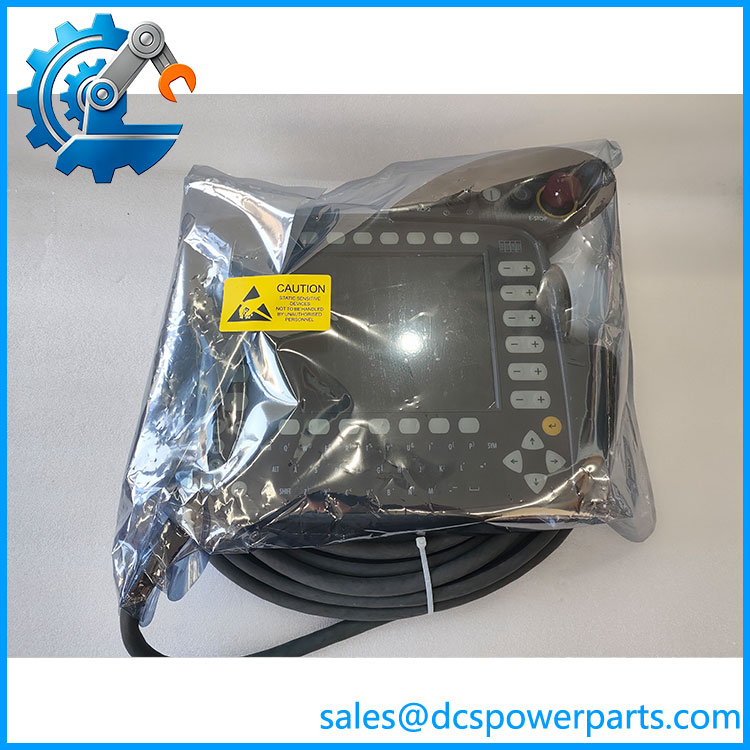
KCP2 00-130-547
Related Products
These related KUKA components and pendant variants may be relevant during maintenance planning. They are not automatically interchangeable with 00-130-547.
- KUKA 00-110-185 — Another pendant part number. Verify controller edition and safety requirements before considering it as an alternative.
- KUKA 00-107-263 — pendant listed with a 20-meter cable; cable length and exact configuration differ from the 10-meter execution.
- KUKA 00-131-239 — variant listed with a 20-meter cable. Confirm the required edition and system configuration before substitution.
- KUKA 00-122-429 — variant listed with a 10-meter cable and a long round connector. Connector differences require particular attention.
- KUKA 00-132-341 — hand control unit listed for an ed.05 configuration. Confirm its full specifications before treating it as a replacement.
- KUKA 00-107-264 — variant listed with a 20-meter cable. Do not assume it has the same cable or safety configuration as 00-130-547.
Frequently Asked Questions
1. Which robot controller is KUKA 00-130-547 designed for?
Available product references associate this pendant with the KUKA KR C2 family, including KR C2 ed.05. Confirm the exact controller generation and installed system configuration before purchasing.
2. Can I hot-swap this teach pendant while the robot is running?
Do not assume hot-swapping is permitted. Follow the applicable KUKA service documentation and site lockout and safety procedures. Place the robot and controller in the required safe state before disconnecting or connecting the pendant, then complete the required functional checks.
3. Does this support firmware v3.1?
A specific firmware version such as v3.1 has not been verified for part number 00-130-547. Pendant compatibility depends on the actual controller, system software, and installed configuration. Check the controller’s software records and relevant KUKA documentation before committing to a replacement.
4. Is 00-130-547 compatible with every KR C2 robot?
No universal compatibility claim should be made. The part number is associated with KR C2 installations, but the controller edition, connector, software, and safety configuration still need to match. Confirm these details using the installed pendant’s nameplate and system documentation.
5. What should I check before installing a replacement?
Verify the full part number and edition, inspect the cable and connector, and confirm the enabling device, emergency-stop circuit, mode selection, display, keypad, and 6D mouse. Qualified personnel should complete the prescribed safety and operating tests before releasing the robot for production.
6. How can I verify whether the supplied unit is new or refurbished?
Request written confirmation of the condition category, serial or nameplate details where available, inspection scope, and warranty terms. For a refurbished unit, ask which functions were tested and whether the safety-related controls were included in the test procedure. Do not treat a clean exterior as proof of internal condition.
7. Can I use a different part number if 00-130-547 is unavailable?
Only after confirming compatibility. Other part numbers may differ in cable length, connector, edition, or system requirements. A similar-looking pendant is not sufficient evidence of a valid replacement; obtain confirmation for the specific controller and safety configuration.
Procurement recommendation: Specify KUKA , part number 00-130-547, and request a photograph of the nameplate, cable and connector, declared condition, and written compatibility confirmation for the installed controller. Treat safety-function verification as a commissioning requirement, not merely an incoming inspection item.
