Description
Product Introduction
A failed operator terminal can leave a functioning machine difficult to monitor or control, particularly when the original PLC application depends on legacy HMI software. The GE Fanuc IC754VSI12CTD QuickPanel View is a 12.1-inch color touchscreen interface designed to display machine information and provide operator access to supported control functions.
For maintenance teams keeping established automation systems in service, replacement planning should cover more than screen size and power input. Verify the existing project, serial communication settings, Ethernet configuration, hardware revision, and backup files before installing a replacement.
Key Technical Specifications
| Parameter | Specification |
|---|---|
| Product model | IC754VSI12CTD |
| Manufacturer | GE Fanuc Intelligent Platforms |
| Product family | QuickPanel View |
| Product type | Industrial HMI / operator interface |
| Display size | 12.1 inches diagonal |
| Display technology | Color active-matrix TFT |
| Resolution | 800 × 600 pixels |
| Color depth | 65,536 colors |
| Touchscreen | Resistive, 12-bit resolution |
| Processor | XScale PXA255, 300 MHz |
| DRAM | 32 MB |
| Flash memory | 32 MB |
| Operating system | Windows CE |
| Ethernet | 10/100 Mbps Ethernet |
| Serial interface | One COM1 port supporting RS-232 or RS-485 |
| DC input | 12/24 VDC; confirm permitted range on the unit label and manual |
| Power consumption | Catalogs list less than 48 W; verify the applicable hardware documentation |
| Environmental rating | NEMA 4/12/4X reported in product listings; verify the installed unit’s marking and mounting conditions |
| Operating temperature | 0°C to 50°C |
| Panel mounting | Bezel-mounted |
| Approximate enclosure depth | 60 mm; check the installation drawing and clearance behind the panel |
| Lifecycle status | Reported discontinued |
Specifications are based primarily on the GE QuickPanel View hardware guide and model-specific product records. Confirm electrical and environmental requirements against the manual matching the installed hardware.
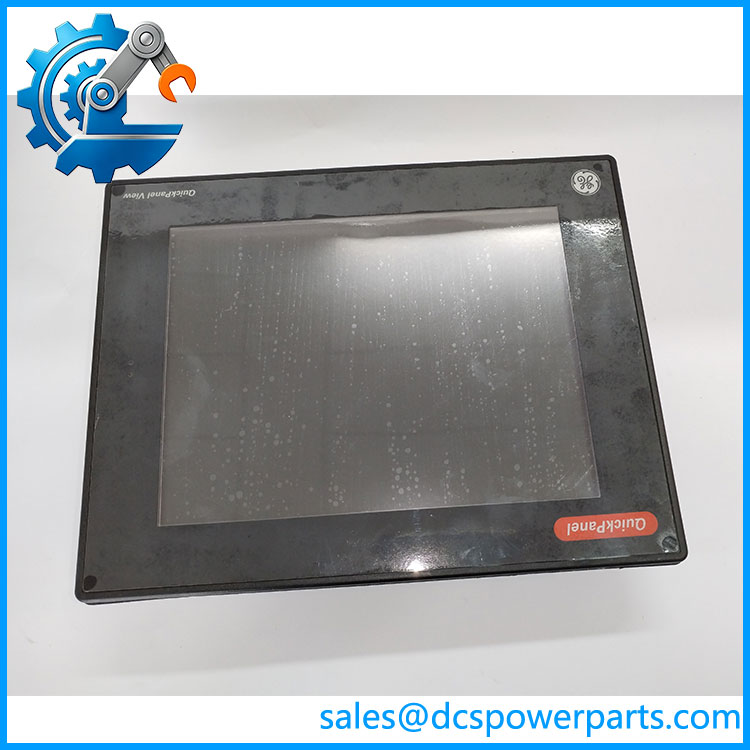
IC754VSI12CTD
Application Scenarios and Pain Points
When a legacy HMI develops touchscreen dead zones, a failing backlight, or intermittent communications, the machine may still run while operators lose access to important status information.
- PLC operator stations: Display machine status, process values, alarms, and operator controls implemented in the existing project.
- Industrial equipment monitoring: Support local visualization where the control application uses compatible QuickPanel View runtime software.
- Maintenance replacement: Restore a failed panel while retaining the existing PLC and control architecture, provided the replacement is compatible.
- Legacy system support: Keep established equipment operational while evaluating the time and cost of a future HMI migration.
Field note: The original manual documents a CCFL backlight with a rated half-life of 50,000 hours and states that the backlight is not field-replaceable. On an older panel, assess display brightness and touchscreen response as part of the incoming inspection.
Related Products
These models are related to the QuickPanel View family. Similar model numbers do not establish direct interchangeability.
| Model | Difference or relevance |
|---|---|
| IC754VSI12MTD | 12-inch monochrome QuickPanel View variant; the MTD suffix distinguishes it from the color CTD model. |
| IC754VBI12CTD | Another 12-inch QuickPanel View model documented in the same hardware guide; verify the exact configuration before considering it. |
| IC754VGI12CTD | Related 12-inch QuickPanel View model covered by the family documentation. Confirm hardware and application compatibility. |
| IC754VSI06STD | Smaller 6-inch QuickPanel View family model; display dimensions and panel cutout differ. |
| IC754VSF12CTD | Another 12-inch color QuickPanel View model. Compare its memory, hardware revision, communications, and project requirements before substitution. |
The 12-inch model variants are covered in GE’s QuickPanel View hardware documentation. The smaller and alternate-model references should be treated as comparison points, not approved replacement recommendations.
Engineer’s Guide: Three Checks Before Replacement
- Back up the original application. Locate the QuickPanel project, runtime version, PLC driver settings, tag definitions, and any custom scripts. Confirm that the project can be restored to the replacement hardware.
- Match the communication interfaces. The documented COM1 port supports RS-232 and RS-485. Verify the selected mode, pinout, cable, baud rate, parity, and PLC protocol. For Ethernet, check IP addressing and network settings.
- Check physical and electrical details. Verify DC supply polarity and range, panel cutout, rear clearance, grounding, mounting seal, and the actual environmental markings. Disconnect power before wiring or removing the panel, and follow the equipment’s isolation procedures.
Frequently Asked Questions
Q1. What is the GE Fanuc IC754VSI12CTD used for?
It is a 12.1-inch color industrial HMI from the QuickPanel View family. It provides touchscreen access to supported machine visualization and operator-control applications.
Q2. What voltage does IC754VSI12CTD require?
Product listings specify 12/24 VDC. Check the unit’s nameplate and the applicable hardware guide before connecting a power supply.
Q3. Does this model support Ethernet and serial communication?
Yes. Documentation identifies a 10/100 Mbps Ethernet interface and one configurable RS-232/RS-485 serial port. Verify the existing PLC connection and cable pinout during replacement planning.
Q4. Can IC754VSF12CTD replace IC754VSI12CTD?
Do not assume so. Compare the full catalog numbers, hardware revisions, memory configuration, application requirements, connectors, and installation dimensions. Use a documented cross-reference or engineering approval before substituting models.
Q5. Is IC754VSI12CTD discontinued?
Available product records report it as discontinued. For a legacy installation, verify the replacement unit’s condition and testing evidence, and retain the original project backup where possible.
Q6. What should I check when buying a refurbished unit?
Request photographs of the nameplate and connectors, touchscreen and display test results, evidence of power-up testing, the unit’s hardware revision, and written warranty terms. Confirm whether the unit has been tested with an application or only powered on.
Q7. Does a replacement HMI automatically contain the original PLC project?
No. Do not assume that application files, PLC communication settings, licenses, or custom configurations are included. Confirm project availability and software compatibility before removing the original terminal.
Procurement recommendation: For , prioritize exact model identification, a working touchscreen and display, verified communication ports, and application restoration capability. These checks reduce the risk of receiving a physically similar panel that cannot be commissioned in the existing control system.